PerksPe Mobile Overview
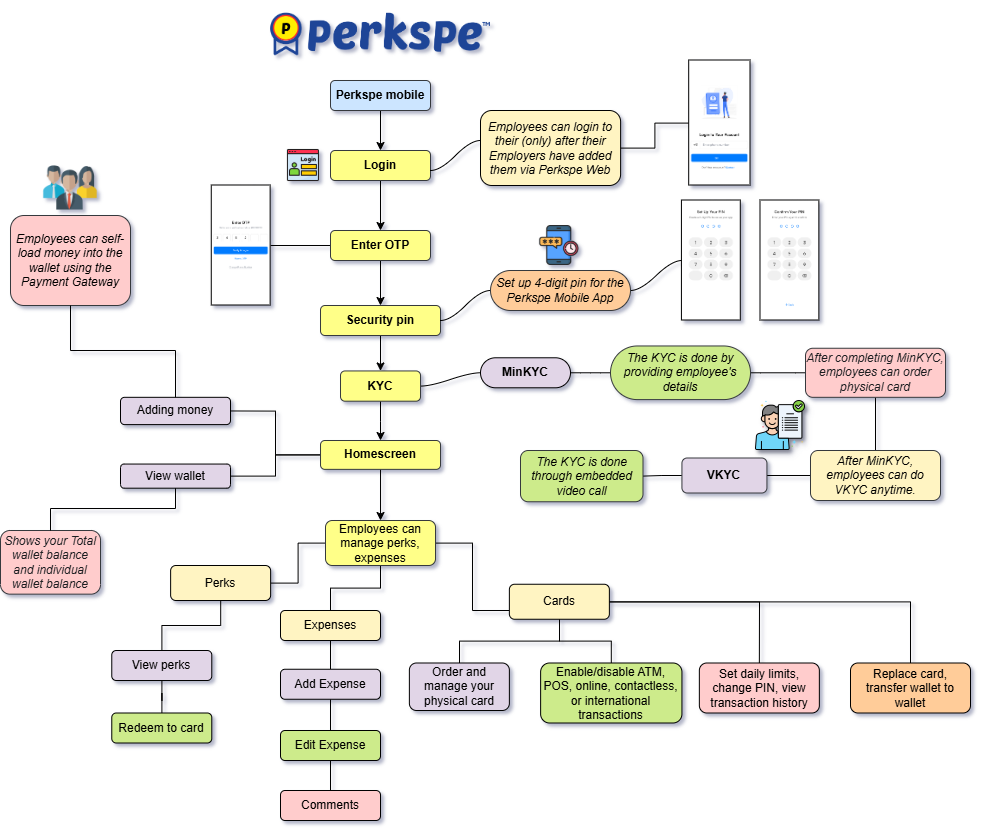
The PerksPe mobile app puts your benefits, PEP Coins, RuPay card, and expense tools in your pocket. Employees use it daily to check balances, redeem rewards, submit expenses, and complete identity verification.
Why Use the Mobile App?
📱
Instant Access
View perk balances and PEP Coins anytime, anywhere.
💳
RuPay Card
Manage your physical card, check transactions, and pay at merchants.
📝
Quick Expenses
Snap a receipt photo and submit expenses in seconds.
🔐
Secure Login
OTP verification, MPIN, and biometric authentication.
Mobile App Features
Key Features Summary
| Feature | What you can do |
|---|---|
| Getting Started | Install the app, log in with OTP, set up MPIN |
| Homepage | View balances, recent activity, and quick actions |
| KYC | Complete minimum and video KYC for card activation |
| Cards | View card details, transactions, and card controls |
| Perks | See assigned perks and redeem PEP Coins |
| Expenses | Create and track expense submissions |
Setup in 3 Steps
1
DownloadDownload the PerksPe app from Google Play Store or Apple App Store.
2
Log inLog in with your registered mobile number and verify via OTP.
3
Complete KYCComplete KYC to activate your RuPay card and start redeeming perks.
Web vs. Mobile — When to Use Which
Platform Comparison
| Task | Web | Mobile |
|---|---|---|
| Set up company & create perks | ✅ Best choice | — |
| Add employees & assign roles | ✅ Best choice | — |
| Approve expenses (admin) | ✅ Best choice | — |
| View perk balance & redeem coins | ✅ | ✅ Best choice |
| Submit expense with receipt photo | ✅ | ✅ Best choice |
| Complete KYC & manage RuPay card | — | ✅ Best choice |
| Check card transactions | ✅ | ✅ Best choice |